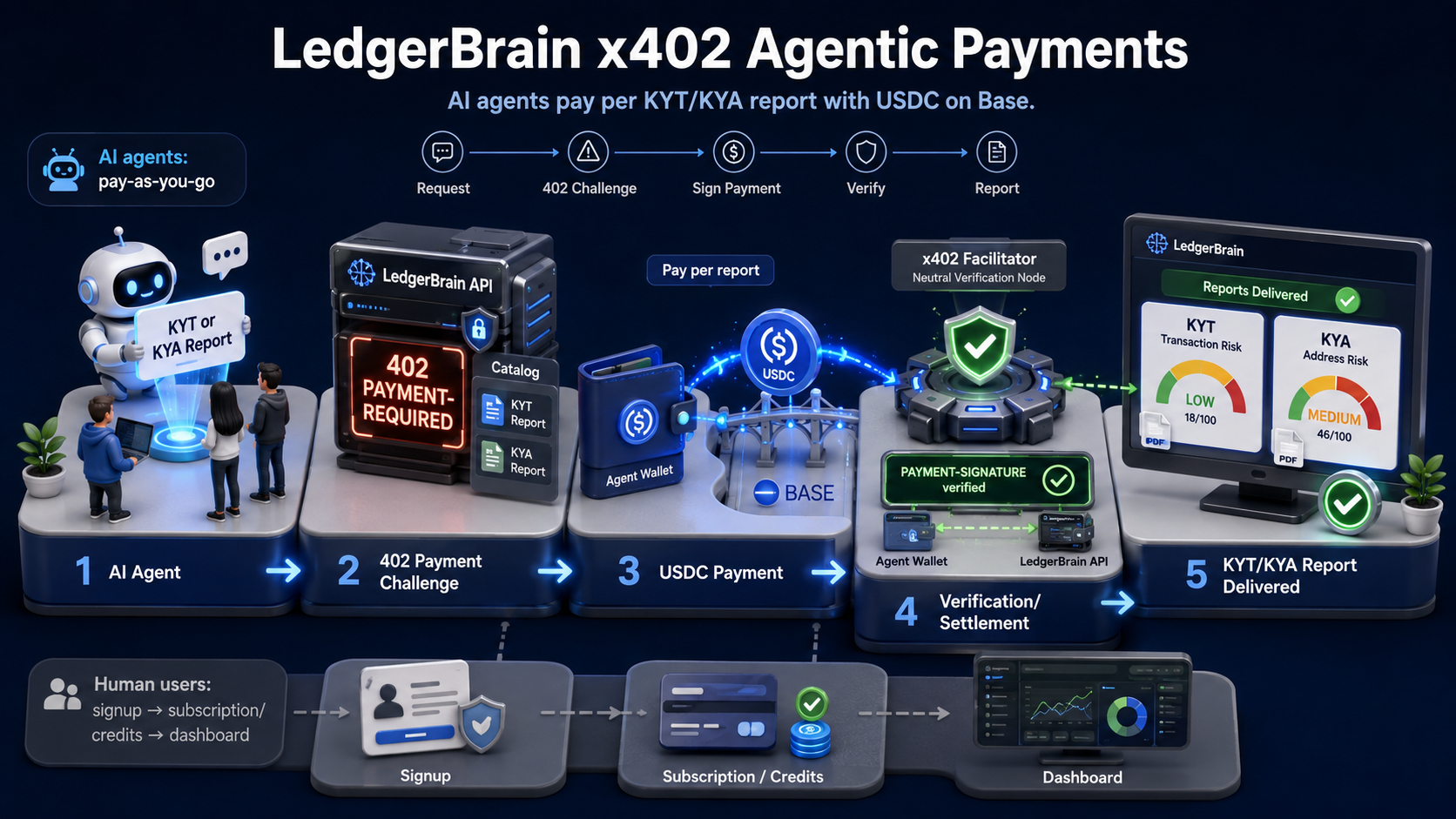
x402 Pay-as-you-go — LedgerBrain API

LedgerBrain supports pay-per-report KYT and KYA access for AI agents using the x402 v2 payment protocol. No account or subscription required. Pay $1 per report in USDC on Base.

Pricing

Payment Flow

  1. Agent requests a paid endpoint
  2. API returns HTTP 402 with PAYMENT-REQUIRED header
  3. Agent signs payment using an x402-capable wallet or client
  4. Agent retries with PAYMENT-SIGNATURE header
  5. LedgerBrain verifies payment and returns the report

Endpoints

Payment Details

FAQ

Do agents need a LedgerBrain account? No.

Is this separate from the human billing system? Yes.

Full API portal: https://api.ledgercore.io/api/v1/portals/ledgerbrain

LedgerBrain LogoLedgerBrain
Back to home
API Docs

x402 Pay-as-you-go

Pay-per-report KYT, KYA, and KYE access for AI agents and API clients. No account or subscription required — pay in USDC per report using the x402 protocol.

Overview

LedgerBrain supports pay-per-report KYT, KYA, and KYE access for AI agents and API clients using the x402 payment protocol. No account, subscription, or pre-purchased credits are required.

Users on a subscription continue to use the existing signup and credit flow at ledgerbrain.io. The x402 path is a separate, account-free payment channel designed for programmatic and agentic access.

AI agents discover available endpoints and pricing through the catalog endpoint, then pay per report in USDC on Base using x402 v2 headers.

LedgerBrain x402 pay-as-you-go overview

Pricing

Pricing is per report. No minimum spend, no subscription required.

ReportPriceDescription
KYT report$1Transaction risk analysis
KYA report$1Address risk analysis
KYE report$1Entity intelligence report
KYAg reportComing soonKnow Your Agent — AI agent identity & risk profiling

Payment token: USDC · Network: Base

Stripe USD settlement available

Payment Flow

LedgerBrain implements x402 v2. The full flow from request to report:

  1. 1

    Agent sends report request

    Agent calls a paid endpoint (e.g., POST /api/v1/x402/kyt/report) without any payment header.

  2. 2

    API returns HTTP 402

    The server responds with HTTP 402 and a PAYMENT-REQUIRED header. The header includes an accepts array with two payment options: pay directly in USDC on Base, or pay to a Stripe-generated deposit address that auto-converts to USD.

  3. 3

    Agent signs payment

    The x402-capable client selects a payment option from the accepts array automatically and signs the payment. No LedgerBrain account is required.

  4. 4

    Agent retries with PAYMENT-SIGNATURE

    The agent resends the original request with the PAYMENT-SIGNATURE header attached.

  5. 5

    API verifies and returns report

    LedgerBrain verifies the payment and returns the full report in the response body. The x402 metadata block in the response confirms which resource was paid for.

Header reference

402 →PAYMENT-REQUIRED: <payment-terms>
retry →PAYMENT-SIGNATURE: <x402-payment-signature>

Endpoints

All x402 endpoints are under https://api.ledgercore.io.

MethodPathDescription
GET/api/v1/x402/healthService health check
GET/api/v1/x402/catalogDiscover all payable endpoints and current pricing
POST/api/v1/x402/kyt/reportPay-per-report KYT transaction risk analysis
POST/api/v1/x402/kya/reportPay-per-report KYA address risk analysis
POST/api/v1/x402/kye/reportPay-per-report KYE entity intelligence report
POST/api/v1/x402/kyag/reportKnow Your Agent — AI agent identity & risk profilingComing soon

Start with GET /api/v1/x402/catalog — it returns the current endpoint list, pricing, and accepted payment tokens.


Request Examples

KYT report request

Analyze a transaction by hash. Include the chain to avoid ambiguity.

POST /api/v1/x402/kyt/report
Host: api.ledgercore.io
Content-Type: application/json
PAYMENT-SIGNATURE: <x402-payment-signature>

{
  "txid": "<transaction-hash>",
  "chain": "bitcoin"
}

KYA report request

Analyze a wallet address for risk exposure and entity attribution.

POST /api/v1/x402/kya/report
Host: api.ledgercore.io
Content-Type: application/json
PAYMENT-SIGNATURE: <x402-payment-signature>

{
  "address": "<wallet-address>",
  "chain": "bitcoin"
}

KYE report request

Look up an entity by name to retrieve risk assessments, ownership, licenses, and more.

POST /api/v1/x402/kye/report
Host: api.ledgercore.io
Content-Type: application/json
PAYMENT-SIGNATURE: <x402-payment-signature>

{
  "name": "Binance"
}

402 response (no payment)

When no payment is attached, the API returns 402 with payment terms.

HTTP/1.1 402 Payment Required
PAYMENT-REQUIRED: <payment-terms>
Content-Type: application/json

{
  "error": "Payment required",
  "x402": {
    "amount": "1.00",
    "token": "USDC",
    "network": "base"
  }
}

Integrations

The following libraries and frameworks support x402 payment signing and work with the LedgerBrain x402 API out of the box.

Coinbase Agentic Wallet

Recommended

An open-source wallet toolkit built for AI agents. Supports x402 payment signing, on-chain USDC transfers, and integrates directly with agent frameworks. Purpose-built for autonomous, programmable payments.

Step-by-step guide

1. Install Coinbase Agentic Wallet Skills

npx skills add coinbase/agentic-wallet-skills

2. Check Wallet Status

npx awal@latest status

Once the wallet is ready, proceed to authentication. Authentication docs ↗

3. Authenticate Your Wallet

npx awal@latest auth login <email>

4. Check Wallet Address and Balance

npx awal@latest balance
npx awal@latest address

5. Fund Your Wallet

Transfer USDC to the wallet address from step 4 using one of the following:

  • · From your personal crypto wallet
  • · By withdrawing from a centralized exchange

6. Call the LedgerBrain x402 API and Pay

KYT — transaction risk report:

npx awal@latest x402 pay "https://api.ledgercore.io/api/v1/x402/kyt/report" \
  --body '{"txid":"<transaction-hash>","chain":"bitcoin"}' \
  --max-amount 1000000

KYA — address risk report:

npx awal@latest x402 pay "https://api.ledgercore.io/api/v1/x402/kya/report" \
  --body '{"address":"<wallet-address>","chain":"bitcoin"}' \
  --max-amount 1000000

KYE — entity intelligence report:

npx awal@latest x402 pay "https://api.ledgercore.io/api/v1/x402/kye/report" \
  --body '{"name":"Binance"}' \
  --max-amount 1000000

--max-amount 1000000 is in USDC micro-units — 1,000,000 = $1.00. Pay-for-service docs ↗

More integration options coming soon. To suggest a library or framework, contact us.


Agent Guidance

Recommended flow for an AI agent or automated client integrating with the x402 API:

  1. 1Call GET /api/v1/x402/catalog on startup to discover available endpoints and current pricing.
  2. 2Send a report request to the appropriate endpoint without a payment header.
  3. 3If you receive HTTP 402, parse the PAYMENT-REQUIRED header. It contains an accepts array with available payment options — direct USDC on Base, or a Stripe-generated address for USD settlement. Your x402 client selects one automatically.
  4. 4Sign and submit the USDC payment using your x402-capable wallet or client library.
  5. 5Retry the original request with the PAYMENT-SIGNATURE header. Do not modify the request body.
  6. 6Parse the returned report from the response body. KYT and KYA reports include a risk score, risk level, exposure breakdown, and entity attribution. KYE reports include entity profile, risk assessments, ownership, licenses, and timeline.
Note: The LedgerBrain platform does not sign x402 payments. Payment signing is handled entirely by the AI agent's own x402-capable wallet or library. No LedgerBrain account is required.

FAQ

Do agents need a LedgerBrain account?
No. x402 pay-as-you-go access requires no account, signup, or subscription. Agents pay per report in USDC.
Is this separate from the subscription billing system?
Yes. Subscription users sign up at ledgerbrain.io and use the credit-based billing system. x402 is a distinct, account-free payment path for AI agents and programmatic access.
Which payment token is used?
USDC.
Which network is currently supported?
Base (USDC).
Can I pay in USD instead of USDC?
Yes. Stripe USD settlement is available. When the API returns HTTP 402, the PAYMENT-REQUIRED header includes an accepts array with two options: pay directly in USDC on Base, or pay to a Stripe-generated deposit address that auto-converts to USD. An x402-capable client handles the selection automatically.
Does the LedgerBrain platform sign payments?
No. Payment signing is handled by the AI agent's own x402-capable wallet or client library. The LedgerBrain platform is for subscription users — x402 is handled entirely client-side.
Where can I find the full API portal?
The full interactive API portal is at api.ledgercore.io/api/v1/portals/ledgerbrain.